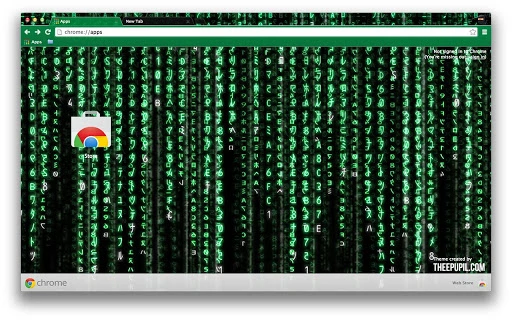

Custom Browser Themes by Thee Pupil
Overview
Thee Pupil offers a curated selection of browser themes designed to personalize the appearance of web browsers on Windows and Mac platforms. These themes are intended for users seeking a unique visual experience while browsing the internet. By altering the interface’s look and feel, they provide a way to express individual style directly within Firefox and Chrome.
The software functions as a visual enhancement tool, allowing users to replace default browser UI elements with custom designs. It is suitable for casual users and design enthusiasts who value aesthetics in their digital workspace. The themes are not interactive tools but focus solely on appearance customization.
Real-world usage includes personalizing a work or home computer to reflect individual preferences, enhancing visual comfort during extended browsing sessions, or simply refreshing the look of a frequently used browser. The developer, Thee Pupil, appears to focus on creative expression through digital design.
Platform compatibility is confirmed for both Windows and Mac, though detailed system requirements were not specified. The application size is 1.5 MB, indicating a lightweight installation. The release date of April 1, 2024, suggests a recent launch, positioning it as a modern option in the browser theme space.
Key Features & Capabilities
- Custom Visual Design – Each theme offers a unique color scheme, icon set, and background layout tailored to specific visual styles.
- Browser-Specific Compatibility – Designed for use with Firefox and Chrome, allowing users to apply themes across multiple popular browsers.
- Lightweight Installation – At 1.5 MB, the theme files are compact, ensuring minimal impact on system storage and fast deployment.
- Easy Application – Themes can be applied directly through browser extension management interfaces, requiring no complex setup.
- Regular Updates – The developer maintains an active presence, encouraging users to visit their website for new releases and theme additions.
Users can apply these themes to transform the browser’s toolbar, tab bar, and new tab page. For example, a user might choose a dark mode theme for reduced eye strain during evening browsing, or a vibrant, artistic theme to reflect a creative mood. The themes are not functional tools but serve purely aesthetic purposes.
Each theme is intended to be used independently, allowing users to switch between designs based on preference or context. The developer has not provided details on theme creation tools or customization options for users, suggesting a consumer-focused model rather than a creator platform.
User Interface, Workflow & Performance
The user interface for Thee Pupil themes is entirely managed through the browser’s extension settings. There is no standalone application interface, as the themes are applied directly within Firefox and Chrome. Navigation is straightforward: users access the browser’s add-on manager, locate the theme, and apply it with a single click.
Workflow efficiency is high due to the minimal setup required. The process involves visiting the developer’s website, downloading the theme file, and installing it via the browser’s interface. No additional software or configuration is needed.
Performance details were not specified by the developer. However, given the file size of 1.5 MB and the nature of browser themes—being primarily visual elements—they are expected to have negligible impact on CPU or RAM usage. The themes do not run background processes, which supports a stable and lightweight operation.
Stability is likely consistent with standard browser theme behavior. Since these are static visual assets, they do not introduce runtime errors or crashes under normal use. The developer did not provide information on update frequency or automatic sync features.
Compatibility & System Requirements
The software is compatible with Windows and Mac operating systems, as stated by the developer. It is designed to work with Firefox and Chrome browsers, though specific version requirements were not listed.
The installation size is 1.5 MB, which is small and suitable for most modern systems. This suggests minimal storage demands and quick download times.
Exact system requirements were not listed. The developer did not provide details on minimum RAM, processor speed, or disk space beyond the file size. Users should expect basic compatibility with standard desktop configurations, but no guarantees are made regarding older hardware or low-memory environments.
Platform-specific behavior may vary slightly between Windows and Mac, but no differences were documented. Users are advised to ensure their browser is up to date to avoid compatibility issues.
Pros and Cons
Pros
- Free to download and use
- Lightweight at just 1.5 MB
- Designed for both Firefox and Chrome
- Simple one-click installation via browser
- Regular theme updates available through the developer’s website
Cons
- No official support for other browsers like Edge or Safari
- Limited to visual customization—no functional features
- Developer did not specify system requirements
- No built-in theme editor or user customization tools
- Updates require manual visit to the developer’s site
FAQ Section
Is Thee Pupil Themes free to use?
Yes, the themes are available at no cost. There are no subscription fees or hidden charges.
Which browsers are supported?
The themes are designed for Firefox and Chrome. Compatibility with other browsers is not confirmed.
Do I need to install additional software?
No additional software is required. The themes are installed directly through the browser’s extension manager.
Are the themes safe to download?
The themes are provided by Thee Pupil through their official website. As they are visual assets and not executable programs, they pose minimal security risk. However, users should only download from the official source.
How do I update my theme?
Updates are not automatic. Users must visit the developer’s website to check for new releases and manually download and install the latest version.
Final Thoughts
Thee Pupil Themes offer a simple, free solution for users looking to refresh the visual appearance of their Firefox and Chrome browsers. With a lightweight footprint and straightforward installation, they are ideal for anyone who values personalization without technical complexity.
While the software lacks advanced functionality, its purpose is clear: to enhance visual appeal. The consistent design quality and regular updates suggest ongoing developer commitment. For users seeking a quick, secure way to customize their browsing environment, this tool delivers a reliable experience.
Despite minor limitations—such as no support for other browsers and the need for manual updates—the benefits outweigh the drawbacks for its target audience. If you're looking to refresh your browser’s look with minimal effort, Thee Pupil Themes are a solid choice.
Download Thee Pupil Themes now







